AI OCR Reader
One photo. Structured fields in seconds.
Take a nameplate photo in the app - get Brand, MPN, Serial and specs as editable fields, not a block of text. No retyping, no templates. Export to Shopify, Odoo, BaseLinker, eBay, WooCommerce - or CSV for any spreadsheet.
No call required - see results in the app in seconds.

From label image to clean data
The OCR is built for real nameplates: scratched, angled, or partly dirty. It returns separate fields — Brand, MPN, Serial, voltage, power — so you can fix anything before export.
You take this photo
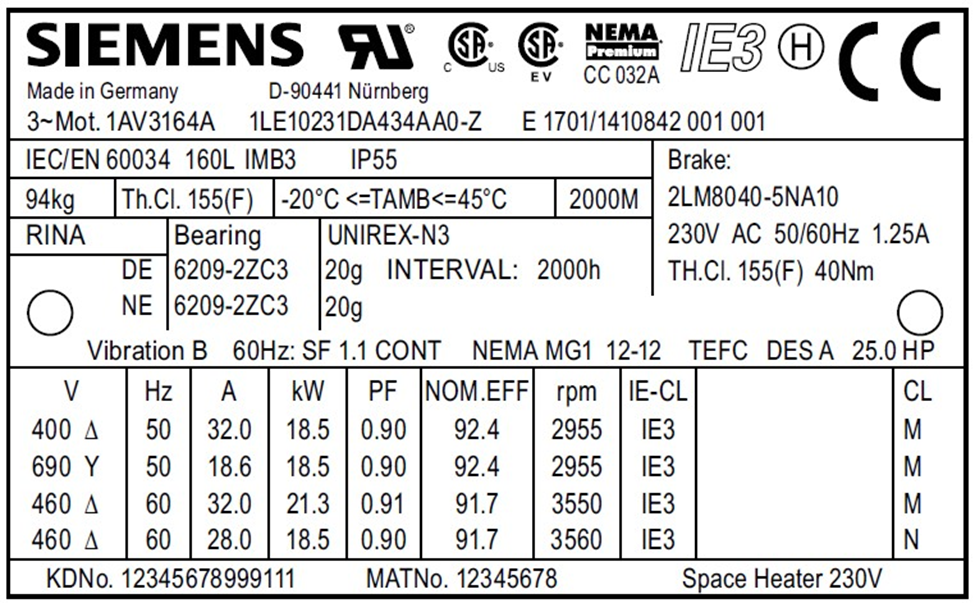
You get these fields (editable)
- Brand
- Siemens
- MPN
- 1LA6 186-0BB40
- Serial
- E 1701/1410842 001 001
- Weight
- 179 kg
Specifications
- Type
- 3-Phase Pole-Reversible Motor
- Power
- 5/18 kW
- Speed
- 725/1460 rpm
- Frame Size
- 180L
- Mounting
- B3 (Foot)
- Protection
- IP54
- Shaft Ø
- 48 mm
How it works
Three steps: capture the nameplate, get structured data (columns you can edit and export, not a block of text), then export to your platform or spreadsheet.
Photo in real conditions
Open the app in your phone browser and take a photo. No install, no special lighting.
Data pops out
Brand, MPN, Serial and specs appear as editable fields. Click any value to correct it. You stay in control before export.
Export to your tools
Use platform export (Shopify, WooCommerce, Odoo, BaseLinker, eBay, PrestaShop) or download CSV/JSON for any spreadsheet. Same columns every time - map once and reuse.
Export to your platform
One - click platform export or download CSV/JSON for Excel, Google Sheets, or any system.
 Shopify WooCommerce
  PrestaShop
  Odoo
Odoo  BaseLinker
  eBay CSV / Excel
 Built for the messy reality of the warehouse
Worn labels, bad light, dust - we’re built for it. One photo per nameplate gives you fields you can trust and export, without the rework.
Spare parts & distribution
Stop retyping from paper lists and blurry photos. One photo per nameplate, fields filled - fewer typos, less eye strain.
Teardown & asset recovery
Document as you strip. Photograph each label, add a condition note, and keep a searchable list with photo proof for every item.
MRO & production
Replace “misc part” with real Brand and MPN. No more guesswork or wrong spare - data comes straight from the nameplate, even when it’s worn or dirty.
FAQ
Questions we hear about nameplate extraction and export.
What kinds of labels does it read?
Industrial nameplates, rating plates, product labels, and simple datasheets. We pull out Brand, MPN, Serial, voltage, power and similar attributes. The model is tuned for real - world nameplates - worn, angled or partly dirty.
What if the photo is blurry or the label is damaged?
You can retake or correct any field before export. The OCR handles imperfect conditions better than classic template - based tools; when it's unsure, you fix it in one place and the rest of the flow stays the same.
Can I run a batch of nameplates?
Yes. Capture multiple nameplates; each photo becomes a row. Export is one CSV or JSON with the same columns.
What if the AI misreads a field?
You can edit any field in the app before export. Fix typos or wrong splits without retaking the photo - everything stays in one screen so corrections are quick.
How do I get data into my system or spreadsheet?
Use platform export for Shopify, WooCommerce, Odoo, BaseLinker, eBay, PrestaShop - or download CSV/JSON for Excel, Google Sheets, or any system that accepts spreadsheets. Column layout is consistent; map once and reuse. Download the sample CSV to see the format.
Is there a free trial?
Yes. Sign up in the app and try the OCR with no credit card. One photo is enough to see the extracted fields.
Free trial - no credit card
See your first nameplate as structured data in the next minute.
Take a photo in the app on your phone - same browser, no install. No setup, no forms, no call required.
No commitment. Cancel anytime.