
On this page
Obsolete parts slow down repairs, inflate costs, and disrupt operations. AI tools solve this by identifying parts in seconds, even from damaged or dirty images, with 98.99% accuracy.
Manual processes rely on outdated methods like spreadsheets and catalogs, wasting time and creating errors. AI-powered solutions, such as AutomaSnap, extract data from photos, cross-check databases, and export ERP-ready data. This speeds up identification, reduces downtime, and cuts costs by up to 20%.
Key benefits include:
- Faster identification: From 30 minutes to under 30 seconds.
- Higher accuracy: Eliminates typos and duplicates.
- Cost savings: Reduces emergency procurement and inventory waste.
- Ease of use: Accessible via smartphone, no expert knowledge required.
AI transforms obsolete parts management, saving time and money while improving efficiency.
Problems with Manual Obsolete Parts Identification
Manually identifying obsolete parts is a time drain and a financial burden. Technicians often spend hours flipping through catalogs or relying on outdated knowledge. For example, if a skilled worker spends just 30 minutes each day searching for parts, that adds up to over 125 hours of lost productivity every year. That’s time that could have been better spent fixing equipment rather than navigating through legacy documents. These inefficiencies highlight the need for AI-driven solutions that can simplify and speed up obsolete parts identification.
Data Errors and Mistakes
Manual processes are notorious for introducing errors into ERP systems. Without standardized naming conventions, the same part may be listed under different names, creating duplicates that can bloat inventory by as much as 15%. This confusion often leads engineers to reorder parts that are already in stock but hidden under alternate names. On top of that, navigating large catalogs can result in ordering uncertified or incorrect components. These mistakes don’t just waste money - they can also pose safety risks and lead to regulatory violations. The inaccuracies in data management only add to the delays and make the entire process more cumbersome.
Slow and Labor-Intensive Work
“Technicians can spend hours searching legacy documents, trying various search terms and SKU variants to find the correct part.” - Karan Jain, Machine Learning Engineer, Mastek
Critical parts information is often buried in static PDFs, paper manuals, or siloed systems. This forces technicians to shuttle between machines, terminals, and warehouses, trying to confirm part details or consulting senior staff. In manual systems, fulfilling a spare part request can take at least two days. This kind of “detective work” eats into “wrench time” - the hours spent actually repairing equipment - replacing it with administrative tasks. When experienced technicians retire, companies lose their “tribal knowledge”, which further slows down service and disrupts operations.
Delays in the Supply Chain
Manual verification of parts bogs down procurement, causing delays that ripple through the supply chain and result in missed service SLAs. When part identification takes too long, repairs stall, forcing companies to shift production schedules, postpone preventive maintenance, or rely on expensive emergency fixes. Downtime caused by these delays can cost manufacturers thousands of dollars per minute in lost output. The problem becomes even more severe with obsolete parts - once a part is deemed end-of-life, its supply chain quickly shrinks, making replacements harder to find. Manual systems also lack real-time stock visibility, leading to overstocking non-essential parts while critical spares run out. These challenges make a strong case for AI tools like AutomaSnap, which can streamline the entire process efficiently.
How AI Tools Simplify Obsolete Parts Identification
AI tools have transformed the once tedious and error-prone task of identifying obsolete parts into a quick and efficient process. These platforms can extract crucial details from nameplate photos, cross-check the information against multiple databases, and provide actionable results - even when parts are damaged, dirty, or poorly documented. This technology has significantly reduced the guesswork and stress traditionally faced by maintenance teams.
Automatic Data Extraction from Nameplates
AI tools like AutomaSnap can turn a simple photo of a nameplate into structured data fields such as Brand, MPN, and Serial Number. Even when the nameplate is worn out or affected by environmental factors, these tools can still extract the necessary information - something manual methods often fail to do. This is particularly useful for obsolete parts, where original documentation is often unavailable.
“AI-enabled spare part lookup reduces search times and minimizes trips to terminals, warehouses, and inquiries to senior technicians to identify the correct part.” – Philipp Descovich, IBM
The accuracy of AI models in data extraction exceeds 90%, and they can cut the time needed for these tasks by over 60%. Even technicians with minimal experience can identify rare or complex components in less than 30 seconds using just a smartphone camera. This levels the playing field, reducing reliance on the deep, informal knowledge often held by senior technicians - a resource that can disappear when such workers retire. Once the data is captured, the system enhances image clarity by isolating the part from its background.
Background Removal for Better Images
After extracting data, AI-powered tools preprocess the image by removing background distractions like machinery, cables, or shelving. AutomaSnap, for example, offers one-click background removal, creating clean, standardized images that are perfect for ERP systems and digital catalogs. These refined images also improve the training of neural networks, ensuring that legacy parts are documented clearly for future use.
This technology is built to handle tough conditions. Whether a part is greasy, located in a dimly lit corner, or captured in poor lighting, AI systems can still identify it accurately, unaffected by environmental challenges. Advanced neural networks can now differentiate between as many as 20,000 spare part categories, far surpassing what human memory can achieve.
Fast Market Checks for Pricing and Availability
Once a part is identified, AI tools can quickly determine if it is obsolete, check its current pricing, and verify availability by cross-referencing internal databases and trusted market sources. AutomaSnap, for instance, offers instant market checks with links to platforms like eBay and Automanet, enabling procurement teams to compare prices and find alternatives in seconds. This real-time tracking also flags parts nearing the end of their lifecycle or those already discontinued.
The benefits for procurement teams are significant. AI-driven systems can cut lead times by up to 50% through automated sourcing strategies. If a part is discontinued, the system checks compatibility factors like voltage, mounting, and interface to ensure that suggested alternatives will work correctly. This minimizes costly mistakes, even under tight deadlines. Companies using these tools have reported a 20% reduction in emergency procurement costs and have optimized inventory levels by about 20% by avoiding duplicate orders and improving stock management.
Benefits of Using AutomaSnap for Obsolete Parts Management

AutomaSnap addresses the challenges of managing obsolete parts, offering a streamlined, efficient alternative to manual processes.
Better Accuracy in Identifying Obsolete Parts
When it comes to managing critical breakdowns, accuracy is non-negotiable. A single error - like mistyping a 16-digit serial number - can lead to ordering the wrong replacement motor at a time when every second counts. AutomaSnap’s AI-powered OCR eliminates these risks by extracting data directly from nameplate photos, removing the chance for manual typos.
The system also standardizes manufacturer and model fields automatically, resolving inconsistencies such as “HP” versus “hp”. Technicians can then act as visual auditors, reviewing and confirming the AI-extracted data for added assurance. Even in tough conditions, the AI maintains over 90% accuracy in identifying parts.
“One typo in a model number can lead to a technician ordering the wrong replacement motor during a breakdown. When the foundation of your maintenance asset data is flawed, trust in the system falls apart.” – Alexandra Vazquez, Limble CMMS
Time and Cost Savings
AutomaSnap’s precision directly translates into time and cost efficiency. While manual asset setup can take 15–30 minutes per item, AutomaSnap slashes this time to under 2 minutes. This automation enables organizations to onboard legacy and obsolete assets up to 80% faster, cutting operational costs by as much as 97% when nameplate data extraction is automated.
The system also enhances productivity, enabling technicians to focus on repairs rather than tedious data entry. AI-powered workflows can improve technician efficiency by 35%. Additionally, by identifying duplicate entries and normalizing naming conventions, companies can reduce inventory levels by around 30%. In industries where downtime can cost $260,000 per hour, these savings add up quickly.
ERP-Ready Data Exports
AutomaSnap goes beyond just accuracy and speed - it ensures data is ready for major ERP and CMMS platforms like SAP, Odoo, and IBM Maximo. Extracted data is formatted into spreadsheets with consistent naming conventions and unique part IDs, making it ready for seamless import. This eliminates the manual reformatting that often delays system migrations.
For example, in January 2026, an industrial plant used an AI-powered asset creation workflow during a facility-wide equipment audit. By replacing a two-person manual transcription team with a single technician using AutomaSnap, the plant reduced the time needed to digitize legacy equipment by 70%. The standardized data then served as a solid foundation for a smooth ERP migration.
“The clean parts master becomes the foundation for any ERP migration. It removes the data bottlenecks that typically delay go-lives.” – Sumit Sinha, CTO & Co-Founder, Kavida.ai
Manual vs. AI-Powered Obsolete Parts Identification
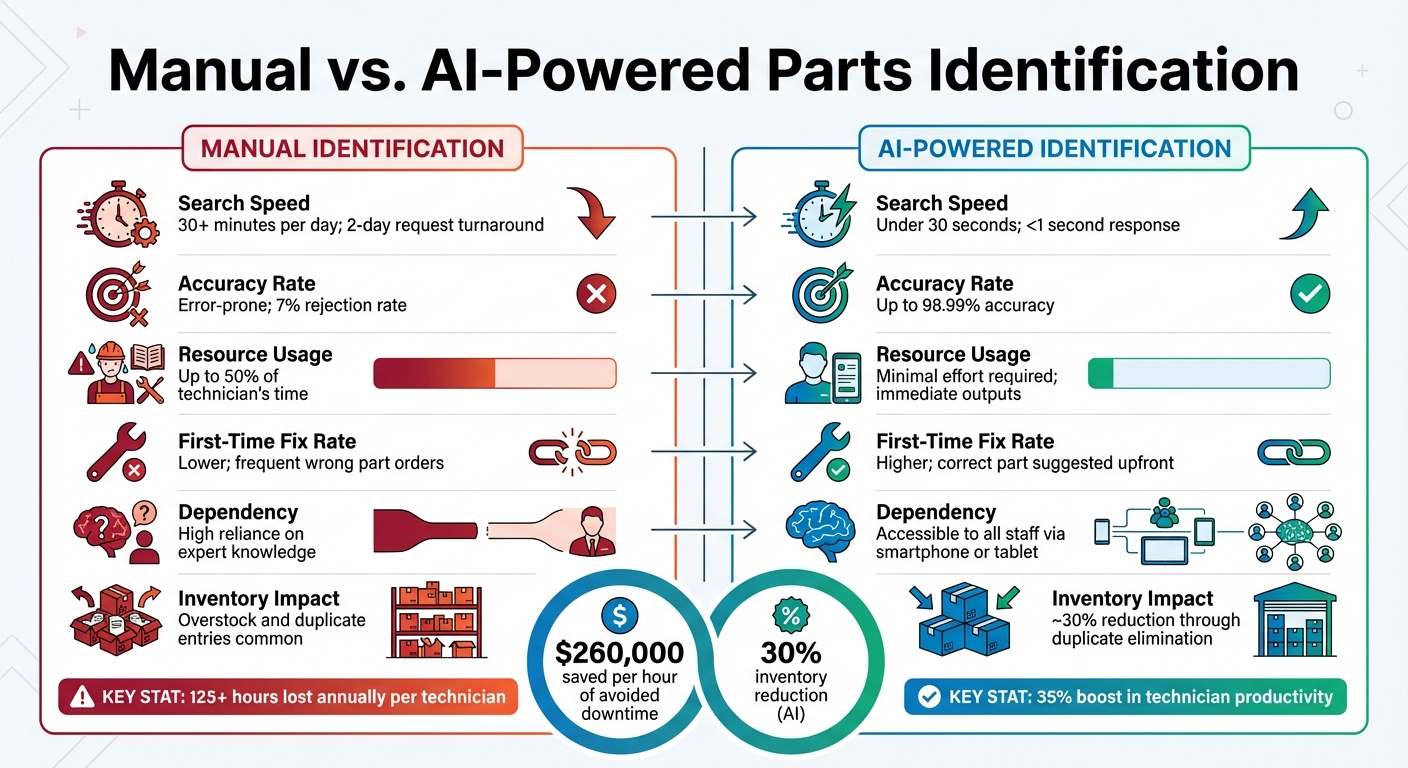
The difference between manual and AI-driven identification is stark - it’s a shift from guesswork to precision. Manual identification often relies heavily on the expertise of senior staff, and when that expertise is unavailable, errors can skyrocket. Many maintenance teams still depend on outdated tracking methods, leading to costly mistakes and fragmented data.
The inefficiencies of manual processes are staggering. For instance, if a technician spends just 30 minutes a day searching for parts, they lose over 125 hours annually - that’s more than three weeks of work. In some facilities, maintenance staff spend up to 50% of their time just identifying and locating parts. This time drain not only hampers productivity but also pulls skilled workers away from critical repairs, leading to burnout and operational slowdowns.
“A single technician spending just 30 minutes a day on spare part lookups loses over 125 hours per year.” – Linda Piercy, Partium
AI-powered systems completely change the game. These tools leverage computer vision and neural networks to identify parts - even if they’re dirty, damaged, or contaminated. Advanced AI systems can deliver results in under one second, while mobile-based visual recognition enables technicians to take a quick photo and receive identification within 30 seconds. The accuracy is equally impressive, with some platforms achieving 98.99% recognition rates. Compare this to manual methods, where 7% of end-of-life parts are discarded annually because they can’t be identified. The contrast becomes even clearer when you examine their performance side by side.
Performance Comparison
Here’s how manual and AI-powered identification stack up:
| Performance Metric | Manual Identification | AI-Powered Identification |
|---|---|---|
| Search Speed | 30+ minutes per day; 2-day request turnaround | Under 30 seconds; <1 second response |
| Accuracy Rate | Error-prone; 7% rejection rate | Up to 98.99% accuracy |
| Resource Usage | Up to 50% of technician’s time | Minimal effort required; immediate outputs |
| First-Time Fix Rate | Lower; frequent wrong part orders | Higher; correct part suggested upfront |
| Dependency | High reliance on expert knowledge | Accessible to all staff via smartphone or tablet |
| Inventory Impact | Overstock and duplicate entries common | ~30% reduction through duplicate elimination |
The financial impact of these differences is enormous. For example, in industries like mining, one hour of avoided downtime can save approximately $260,000 in lost productivity. AI-powered systems not only save time but also boost technician productivity by 35% by eliminating manual searches. They also optimize inventory by reducing duplicates and unnecessary stock, cutting costs further.
The benefits go beyond efficiency - AI transforms how organizations manage obsolete parts. For those still using paper catalogs and spreadsheets, adopting AI isn’t just an upgrade; it’s a complete overhaul of operational capabilities.
Conclusion
AI-powered tools for identifying obsolete parts are reshaping maintenance operations in a big way. The results speak for themselves: businesses have seen a 35% boost in technician productivity, a 75% drop in manual entry errors, and a 30% reduction in inventory levels.
But the impact goes beyond just speed and accuracy. Solutions like AutomaSnap are cutting down the reliance on senior technicians who often hold critical “tribal knowledge.” Imagine this: a junior tech can snap a photo and identify an outdated part in less than 30 seconds. That means fewer disruptions caused by knowledge gaps or workforce turnover. Plus, these tools address the mismatch between long-lasting assets and short-lived electronic components, solving a problem that has plagued repair teams for years. By tackling these challenges, AI transforms how repairs are handled and how inventory is managed.
“In 2025 and beyond, investing in smarter spare parts search isn’t a convenience - it’s a competitive edge.” - Partium
Key Takeaways
The advantages of AI-powered identification tools are hard to ignore:
- AI extracts data directly from nameplates, creating ERP-ready exports that eliminate manual entry errors.
- It compensates for poor lighting, filters out background noise, and exports data that can be easily imported into platforms like SAP, IBM Maximo, and Dynamics 365.
For a quick start, try a 30-day pilot with 100–1,000 high-friction parts to showcase the benefits. Before scanning, clean nameplates to ensure better accuracy, and double-check AI-extracted data with a quick two-second review - especially for older parts where small errors, like mistaking a “B” for an “8”, can occur. These simple steps refine inventory processes and free up technicians to focus on critical repair work.
FAQs
What photos work best for identifying an obsolete part?
When identifying outdated parts, photos that clearly capture the asset’s nameplate are incredibly useful. These images should include key details like the brand, model number, and serial number. With the help of AI-powered tools, this information can be extracted automatically, making the process faster and minimizing mistakes.
How does AI confirm a part is truly obsolete and find a replacement?
AI uses predictive analytics and lifecycle monitoring to pinpoint obsolete parts. By analyzing data such as supply chain trends and usage patterns, it identifies components that are no longer in production. Beyond just flagging outdated parts, AI also evaluates compatibility and availability to recommend suitable replacements. This approach not only ensures precise identification but also helps reduce downtime, streamlines inventory management, and minimizes errors that often occur with manual processes.
How do I export AI-captured part data into SAP or Dynamics 365?
To transfer AI-captured part data into systems like SAP or Dynamics 365, you’ll need an AI tool that can produce ERP-compatible file formats, such as spreadsheets. For instance, you could use AutomaSnap to organize and export the data into structured files like CSV or Excel. Once that’s done, these files can be imported into your ERP system using tools such as SAP Data Services or Dynamics 365 Data Management. Be sure to consult your ERP system’s import documentation for specific instructions.