On this page
Managing surplus parts inventory manually is expensive and error-prone. Businesses lose millions annually due to poor data quality, duplicate records, and inefficiencies in manual processes. Here’s how digitization with AI can transform your inventory management:
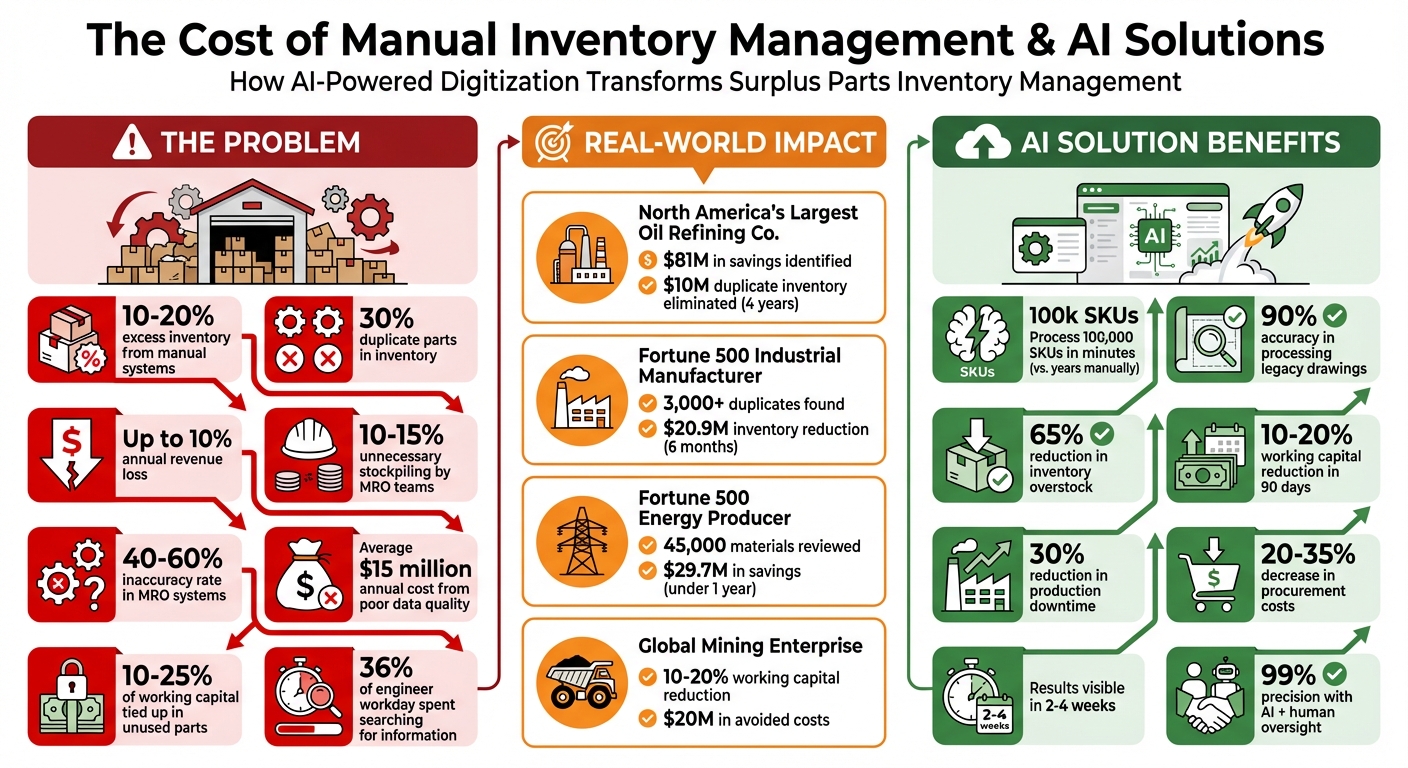
- The Problem: Manual systems lead to 10-20% excess inventory, 30% duplicate parts, and up to 10% revenue loss annually.
- The Solution: AI-powered tools clean, standardize, and validate data faster, identifying duplicates and filling in missing details. For example, AI can process 100,000 SKUs in minutes versus years manually.
- Key Benefits: Reduced working capital, fewer duplicate orders, and faster part identification. Companies have saved millions by consolidating inventory and eliminating redundancies.
AI also predicts demand, adjusts stock levels, and identifies obsolete parts, ensuring efficient inventory management. By starting with a pilot program and maintaining clean data, businesses can cut costs and improve efficiency without overhauling existing systems.
Common Challenges in Digitizing Surplus Parts Inventory
Digitizing surplus inventory isn’t as straightforward as it sounds. Two major hurdles stand in the way: data scattered across multiple formats and older parts with little to no documentation. These issues typically result in fragmented, inconsistent information and significant gaps in legacy records.
Working with Inconsistent and Fragmented Data
Surplus parts data often exists in a messy, fragmented state. It’s spread across various systems - frequently outdated ERP platforms - each with its own naming rules and structures. The situation becomes even more chaotic after corporate mergers or acquisitions, where differing data taxonomies collide. A decentralized procurement process adds to the confusion, creating “semantic drift.” For instance, the same bearing might be labeled as “Bearing-Radial-8mm” in one location and “8mm Radial Ball Bearing” in another.
The problem intensifies with manual data entry. One technician might abbreviate titanium as “TI”, another might spell out “Titanium”, and a third could use “Ti.” Units of measurement are another headache - some records use inches, others millimeters, and some omit units entirely.
“The same physical component might be listed under different part numbers, descriptions, or formats in each system - turning everyday procurement and inventory planning into a guessing game,”
says Sumit Sinha, CTO & Co-Founder at Kavida.ai.
This inconsistency has real financial consequences. Maintenance, Repair, and Operations (MRO) teams often stockpile 10% to 15% more inventory than they need because fragmented data makes it hard to track existing items. For example, North America’s largest downstream oil refining company used AI to consolidate fragmented MRO data across multiple sites. Over four years, they identified $81 million in potential savings and eliminated $10 million in duplicate inventory.
While fragmented data disrupts efficiency, aging inventory presents an entirely different set of challenges.
Digitizing Older Inventory with Missing Documentation
Legacy parts often come with little to no digital record. Handwritten labels fade, paper invoices get lost, and maintenance logs sit untouched in filing cabinets. Without manufacturer documentation, technicians waste valuable time trying to identify unknown components. Automated data cleaning processes often reveal that 10% to 20% of inventory is obsolete.
Thankfully, technology offers some solutions. OCR (Optical Character Recognition) can scan physical documents and transform them into searchable digital files. AI-powered image recognition takes it a step further, allowing technicians to photograph undocumented parts and match them to existing catalogs or OEM databases. AI can also fill in missing details by cross-referencing sparse data with massive external datasets, some of which contain over 350 million OEM part records. This process enriches the data with technical specs, drawings, and manufacturer information that were never recorded in the first place.
AI-driven data cleansing projects can produce a unified master list in weeks - something manual methods would take months to achieve. Organizations often start seeing results within just 2 to 4 weeks, making it possible to tackle decades of neglected inventory records. These tools are essential for streamlining data extraction and filling in the gaps left by outdated documentation.
Technologies for Extracting Inventory Data
Modern tools for data extraction combine advanced technologies to retrieve accurate information from physical parts, documents, and images. These solutions are designed to tackle challenges like faded records and incomplete legacy documentation. They can handle everything from worn nameplates to decades-old engineering drawings.
Using Optical Character Recognition (OCR)
OCR technology digitizes text from sources like nameplates, invoices, purchase orders, and maintenance records. It extracts part numbers, serial numbers, and technical specifications directly from photos or scanned documents, saving countless hours of manual data entry. This technology is especially effective in dealing with unstructured data often found in shop-floor environments.
AI-Powered Image and Document Recognition
Building on OCR, AI-powered systems interpret context and technical jargon to standardize inconsistent entries. For example, they can link “SS FLANGE 3IN” to “Flange, Stainless Steel, 3 inch.” These tools also identify unknown parts by matching them against large databases, completing searches in under 30 seconds. When physical photos aren’t available, these systems can convert 3D CAD files into photorealistic images for around $3.60 per part - much cheaper than traditional photography, which can cost between $150 and $250. AI can also extract structured Bill of Materials data from legacy 2D engineering drawings and 3D models. In one example, a global company processed over 100,000 legacy drawings with 90% accuracy, leading to a 65% reduction in inventory overstock.
Automated Data Collection with AutomaSnap
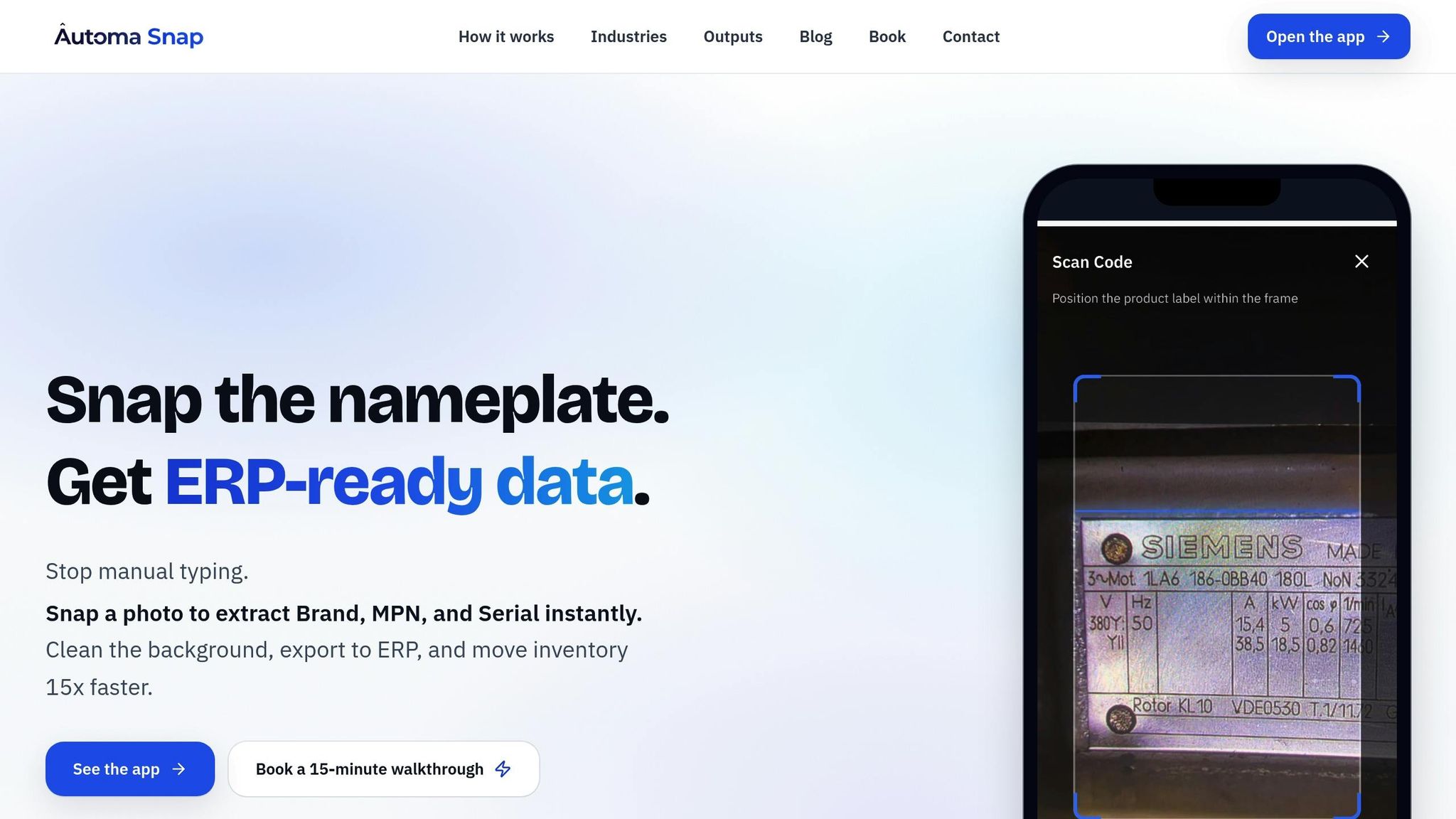
AutomaSnap simplifies the entire data extraction process by capturing structured details - such as Brand, Manufacturer Part Number (MPN), and Serial Number - from nameplate photos. It automatically removes backgrounds and creates ERP-ready spreadsheets compatible with platforms like SAP, Odoo, Dynamics 365, and BaseLinker. The system works directly in a web browser using a smartphone camera, with no additional tools required. Each inventory record includes photo proof for verification, ensuring an audit trail. Even in challenging conditions, such as when labels are damaged or partially obscured, AutomaSnap processes shop-floor photos effectively, making it a practical solution for warehouses.
These advancements in extraction technology pave the way for organizing and standardizing inventory data more efficiently.
Standardizing and Organizing Inventory Data
Turning raw inventory data into a format that works seamlessly with your digital systems is no small task. After using advanced extraction methods, the next step is to clean, validate, and structure the data so it aligns with your ERP system. This involves eliminating duplicates, filling in missing details, and ensuring everything meets the specific requirements of your ERP. Once the raw data is refined, the focus shifts to accuracy and consistency.
Validating Data Accuracy and Consistency
A key part of data validation is identifying parts that might be listed under different names or identifiers. For example, North America’s Largest Downstream Oil Refining Co. used AI-driven tools to clean up fragmented MRO data across multiple sites over a four-year period ending in 2024. This effort led to the elimination of $10 million in duplicate records and revealed $81 million in savings opportunities. In one instance, the system flagged a 92% match between “6205-ZZ SKF” and “Ball Bearing 25mm.” A human reviewer confirmed they were the same part before consolidating the records.
Standardization also plays a big role here. For instance, you might need to decide whether “belt” and “drive belt” should be treated as the same item, or if “SS” and “Stainless Steel” mean the same thing in your context. AI tools can handle much of this work, resolving synonyms and abbreviations like recognizing “TI” as “Titanium” or converting “3IN” to “3 inch.” However, human oversight is crucial for ambiguous cases, ensuring up to 99% precision.
Duplicate records in MRO datasets can inflate procurement costs by 20% to 35%. For example, a Fortune 500 Industrial Equipment Manufacturer used AI validation to identify over 3,000 duplicate materials in just six months, uncovering $20.9 million in inventory reduction opportunities. Dirk Herbrich, Value Stream Lead for Asset Master Data at Bayer AG, highlighted the impact of clean data:
“SPARROW helps us turn MRO data into real business value - reducing duplicates, cutting costs, and enabling smarter ways of working across Bayer”.
Once the data is validated, the next step is formatting it for ERP integration.
Formatting Data for ERP Systems
ERP systems require data to follow strict field structures and standardized formats. Key fields like Manufacturer Part Number (MPN), Manufacturer, Description, and Technical Attributes must adhere to predefined naming conventions. For instance, a typical format might look like this: [Part Type]-[Dimensions]-[Material] (e.g., “Flange-Stainless Steel-3 inch”). Dates should follow the MM/DD/YYYY format, dimensions should be in inches or feet, and temperatures in Fahrenheit.
Parts also need to be mapped to taxonomies like UNSPSC or ECLASS to ensure global procurement compatibility. Tools like AutomaSnap can simplify this process by generating ERP-ready spreadsheets for platforms like SAP, Odoo, Dynamics 365, and BaseLinker. These spreadsheets can even include photo verification for added accuracy.
To fill in missing details, you can pull data from OEM catalogs or public engineering libraries to complete technical specifications. Regular audits - whether monthly or quarterly - are essential to catch inconsistencies or outdated entries before they cause problems. Keeping MRO records clean can have a major impact, reducing production downtime and unnecessary spending by up to 30%.
Using AI to Optimize Surplus Inventory
Once your inventory data is organized and ready, AI can step in to identify opportunities that manual methods often miss. Traditional inventory management relies heavily on rigid rules and spreadsheets, but AI introduces a dynamic, predictive approach. It adapts to real-time demand patterns and supply chain risks, reducing the amount of capital tied up in idle stock and minimizing the need for emergency purchases.
Predictive Analytics for Demand Forecasting
AI-based forecasting doesn’t just look at basic consumption trends. It incorporates factors like equipment failures, supplier lead times, and fleet attrition. For example, a Global Mining Enterprise used an AI-driven MRO optimization platform during 2025–2026 to consolidate fragmented materials data across multiple sites. The result? A 10% to 20% reduction in working capital and nearly $20 million in avoided costs. Advanced models like DFB-ML refine these forecasts even further. In one study of 1,709 automotive spare parts, a Random Forest model achieved a 4.36% Safe Mean Absolute Percentage Error over an eight-year forecast horizon.
AI also uncovers “hidden” surplus by using semantic matching to detect duplicate SKUs or equivalent parts across various ERP systems - something manual reconciliation often overlooks.
“In the past, spare parts purchasing was a safety net against machine downtimes, leading to overstocked warehouses. With the help of AI, inventories can be tracked and connected so that MRO procurement teams buy only what’s truly needed based on real-world demand”, says Felix Dosch, Senior Account Executive at SPARETECH.
Beyond forecasting, AI simplifies inventory management by flagging redundancies and identifying obsolete items.
Identifying Obsolete Parts and Adjusting Stock Levels
After forecasting demand, AI continues to refine inventory by spotting outdated parts and suggesting stock adjustments. It monitors reorder frequency and usage patterns to identify items that haven’t moved in months - or even years.
“It’s common that 50% of the parts at any factory never move. So, what happens when they buy a new machine? They don’t need the part anymore, so they scrap it. It’s a capital and ecological catastrophe”, explains Martin Weber, CEO of SPARETECH.
In 2024, a Fortune 500 Energy Producer leveraged AI to review 45,000 materials in under a year. This process uncovered $29.7 million in savings and achieved a full inventory audit. AI assigned confidence scores to each part, helping teams prioritize critical stock while reducing quantities for less essential items.
AI also enables smarter stock management across multiple locations. By identifying surplus inventory at one site, it facilitates transfers to locations experiencing shortages, avoiding unnecessary purchases. Instead of relying on static spreadsheets, AI uses real-world delivery times and predicted failure rates to recommend optimal stock levels dynamically.
Steps for Implementing Digitization
Transitioning from manual spreadsheets to AI-powered inventory systems involves more than just purchasing new software. It requires thoughtful planning, team collaboration, and a realistic timeline that addresses potential challenges with legacy data.
Preparing Your Team and Systems
Before launching a digitization initiative, establish a clear governance framework. Create a steering committee with representatives from key departments like IT, Operations, Finance, and Change Management. Assign a dedicated “Classification Administrator” or “Librarian” to oversee new part creation and act as the go-to expert for searches and reporting tasks. Centralizing this responsibility ensures consistency and prevents multiple team members from entering data in conflicting formats.
From the outset, set measurable goals. For example, aim to eliminate duplicate part entries (e.g., reduce them from 15% to zero) and minimize the time engineers spend searching for information - currently, this accounts for about 36% of their workday.
Standardizing naming conventions is a crucial step before implementing any system. Emily Williams, Vice President of Product Management at Syniti, suggests the following approach:
“Assigning a name based on brand, model, make, manufacturer and size - always in that order - is one way to standardize the entry of items”.
Developing an internal glossary where the team collaborates on common part designations and consolidates redundant terms will further enhance uniformity.
Data cleansing and standardization should be top priorities during the launch phase. Map out how the new digitization tool will integrate with ERP or CMMS platforms like SAP, Oracle, or IBM Maximo to ensure smooth data exchange. Once your team and systems are aligned, proceed with a carefully structured rollout.
Creating a Phased Rollout Plan
A phased rollout minimizes risks and allows you to test the system on a smaller scale before expanding organization-wide. Start with a pilot site or a specific SKU family that offers a manageable level of complexity and a quick return on investment. This could be a single warehouse location or a high-turnover product line. The pilot phase serves as the foundation for broader implementation.
After the pilot, conduct a “go/no-go” review based on user feedback and data accuracy. If the system performs well and KPIs show improvement, expand to additional sites every 4–6 weeks.
To support the initial rollout, set up a “war room” for intensive issue resolution during the first 2–4 weeks post-go-live. This team monitors live dashboards, addresses problems within 24 hours, and ensures operations stabilize quickly. Train “super-users” first, and then have them lead role-specific training sessions for frontline staff.
Plan audits at 90 and 180 days to assess financial outcomes in collaboration with your Finance department. Use insights from early rollouts to refine processes for future expansions. After the rollout, focus on maintaining data quality to ensure long-term success.
Maintaining Data Quality and Governance
Achieving clean data is not a one-time event - it requires ongoing effort and structured processes. Assign data stewards to monitor quality KPIs using automated dashboards. Implement approval workflows that require formal sign-off for new part entries to maintain cataloging standards.
Regular audits are essential, especially for large inventories. Define specific error types (e.g., outdated information, missing fields, or inconsistent naming), document findings, and track recurring issues. Inventory inaccuracies can lead to significant costs, with up to 10% of annual revenue lost to emergency fulfillment and excessive safety stock. Only 33% of companies achieve real-time inventory accuracy across locations.
Switch to real-time data entry by capturing information as soon as new parts arrive at the facility. Techniques like ABC analysis (ranking parts by consumption value) and XYZ analysis (ranking parts by demand variability) can help prioritize data management for critical items. Keep your Bill of Materials updated in real time to reflect the spare parts needed for current maintenance tasks.
Ongoing training for inventory staff is key to maintaining both physical and digital systems. As Emily Williams emphasizes:
“The cost of missing just one part match might be thousands of dollars - meaning it’s more important than ever to improve MRO data quality”.
Conclusion
Digitizing surplus parts inventory has become a critical step for organizations aiming to optimize their operations. Relying on manual spreadsheets and scattered data systems ties up 10–25% of total working capital in parts that may never even be used. By adopting AI-driven solutions, companies can move away from reactive “just-in-case” ordering to proactive, data-driven strategies that cut costs and boost efficiency.
The good news? Achieving this doesn’t require a perfect data overhaul. Modern AI platforms can process unstructured data from multiple ERPs and spreadsheets, creating a unified network-wide view. This approach yields quick, measurable results - many organizations report a 10–20% reduction in working capital within just 90 days.
To get started, consider a phased rollout. Begin with a pilot program focusing on a high-turnover SKU, establish clear governance, and expand gradually to achieve financial outcomes within 60 days. Keep in mind that maintaining clean data is an ongoing process. Regular audits, standardized naming practices, and real-time data entry protocols are key to avoiding the 40–60% inaccuracy rate common in many MRO systems.
With AI-driven advancements like data extraction from nameplate photos using tools like AutomaSnap, legacy record digitization via OCR, and predictive analytics, surplus inventory management can be completely reimagined. Poor data quality costs businesses an average of $15 million annually, but AI-powered digitization transforms surplus inventory from a financial drain into a strategic asset - streamlining purchases, eliminating redundancies, and freeing up capital for growth. The tools are here. The time to act is now.
FAQs
What data should I digitize first for surplus parts?
To get started, organize your data by focusing on the criticality, classification, and categorization of surplus parts. Pay close attention to details such as part numbers, descriptions, and inventory levels. By creating a clear and accurate baseline, you’ll set the stage for streamlined and efficient inventory management.
How do I prevent duplicate part records after digitizing?
To keep your inventory accurate and avoid duplicate part records, consider leveraging AI-driven tools for data cleansing and deduplication. These tools analyze key details such as part numbers and descriptions to spot and merge duplicate entries, even when the data is stored in different formats.
Some effective strategies include:
- Standardizing data: Ensure consistent formatting for part numbers, descriptions, and other key fields.
- Automating deduplication: Use AI to streamline the process of identifying and consolidating duplicates.
- Regular updates: Maintain routine checks and updates to keep your inventory data clean and unified.
Using these methods can help create a more accurate inventory system and reduce duplication by up to 15%, saving both time and resources.
What’s the fastest way to digitize legacy parts with missing labels or paperwork?
AI-driven tools offer a fast and efficient way to identify and catalog parts without the need for labels. By using visual recognition, these tools can match images of parts to their corresponding digital records, cutting down on manual work and minimizing errors. On top of that, AI can organize and clean inventory data from multiple sources, simplifying the digitization process while boosting accuracy.